3D industrial inspection

The Ōkato cheese factory in 3D: high-specification industrial inspection

This is what a high-specification 3D inspection model looks like. We captured the old cheese factory at Ōkato, Taranaki, in 1,838 drone photographs and built it into a single model of about 40 million triangles, wrapped in 2.1 billion pixels of photographic texture. Close up, the individual weatherboards, corrugations, fixings, downpipes, vents and patches of rust are there in their true shape and colour, sharp enough to inspect rather than just look at. Step back and the whole site sits in New Zealand's survey coordinates, ready to measure. Choose a measuring tool and click on the model.

  • 1,838 drone photographs
  • About 40 million triangles of 3D surface
  • 2.1 billion pixels of photographic texture (32 images of 8,192 × 8,192)
  • Survey coordinates — positions in NZTM2000, heights in NZVD2016

Map system · NZGD2000 / NZTM2000, heights NZVD2016

Explore and measure it

Street map © OpenStreetMap contributors. Aerial imagery sourced from LINZ, CC BY 4.0.

Choose a tool, then click points on the model. Undo removes the last point, Cancel drops the measurement in progress, and Clear removes every measurement. Each finished measurement is added to the list under the model. The base map menu puts the model on a map of the area; with a map on, the model is set down on the flat map, and positions and heights stay the real ones.

The model streams in small pieces at full detail, so the part you are looking at loads first and sharpens as you move closer. Depending on your internet connection this can take a few seconds; the readout under the model says when detail is still loading.

A closer look

Views from the model, up close.
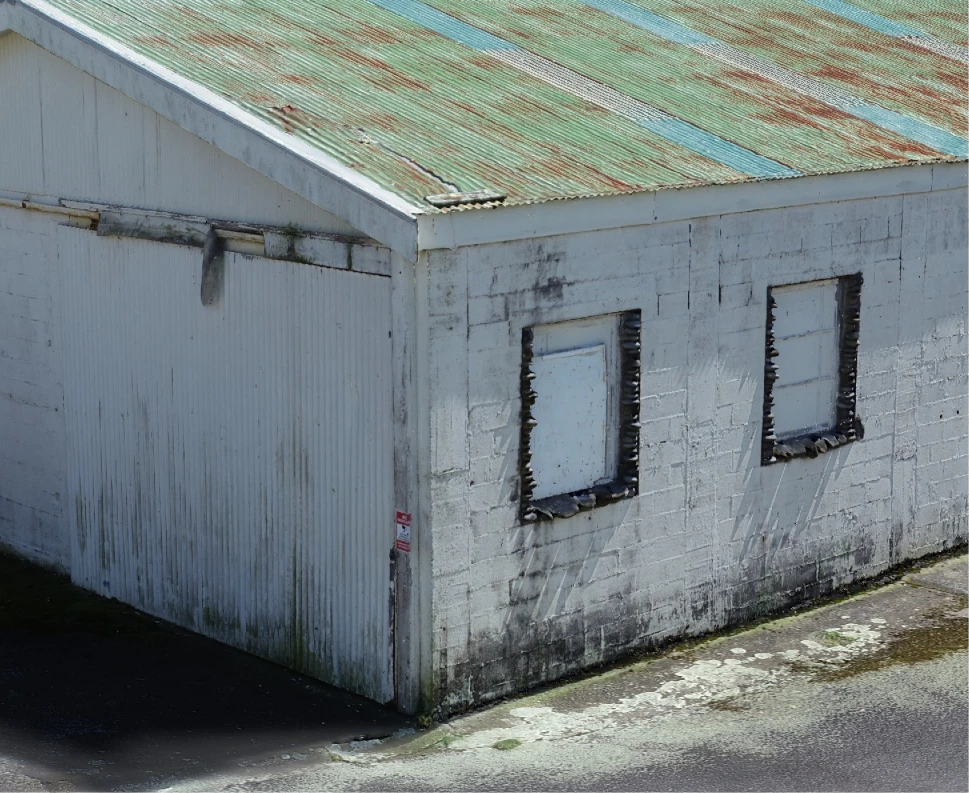
Corner of a building at the Ōkato cheese factory in the 3D inspection model: a rust-streaked corrugated roof, painted block walls with boarded-up windows and weathered frames, a sign by the door, and moss and staining along the foot of the wall
Walls and eaves, not just roofs. Rust streaks on the corrugated roof, the block-work, the boarded-up windows and their weathered frames, a sign by the door, and the moss and staining along the foot of the wall. The model is captured from every angle, looking up under the eaves and all the way round, not only from above, so the sides of a building are modelled in as much detail as the top.
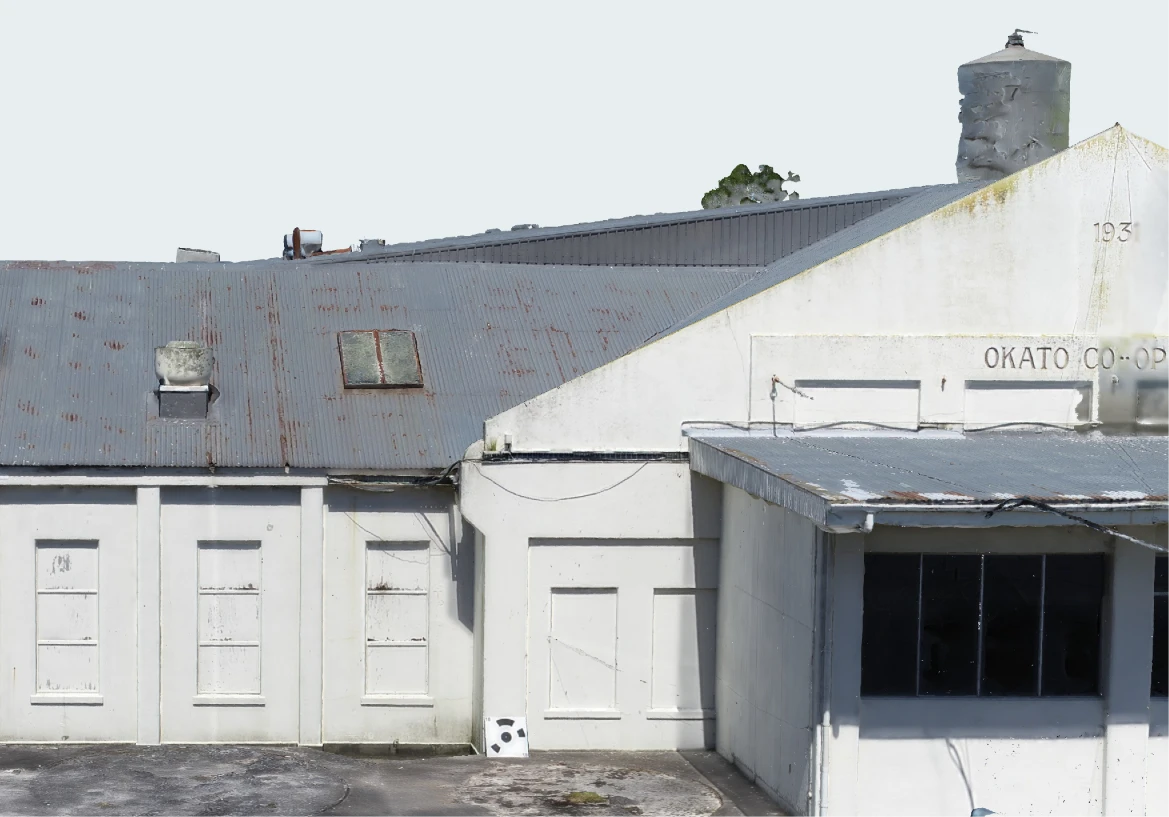
Front of the Ōkato cheese factory in the 3D inspection model: white gabled walls with panelled doors and windows, the lettering OKATO CO-OP on the gable, the water tower behind, and a black-and-white ground control target on the yard
The front, straight on. A square-on view of the walls that many drone models miss or smear: the panelled doors and windows, the cabling along the eaves, the lettering on the gable and the water tower behind. On the yard is one of our ground control targets. We place targets like this across every site and survey each one with a GNSS rover, so the model sits in New Zealand's survey coordinates, holds its true dimensions, and every measurement can be checked against the real world. Centimetre-level accuracy is something we take seriously, and ground control is how we keep it in our hands.
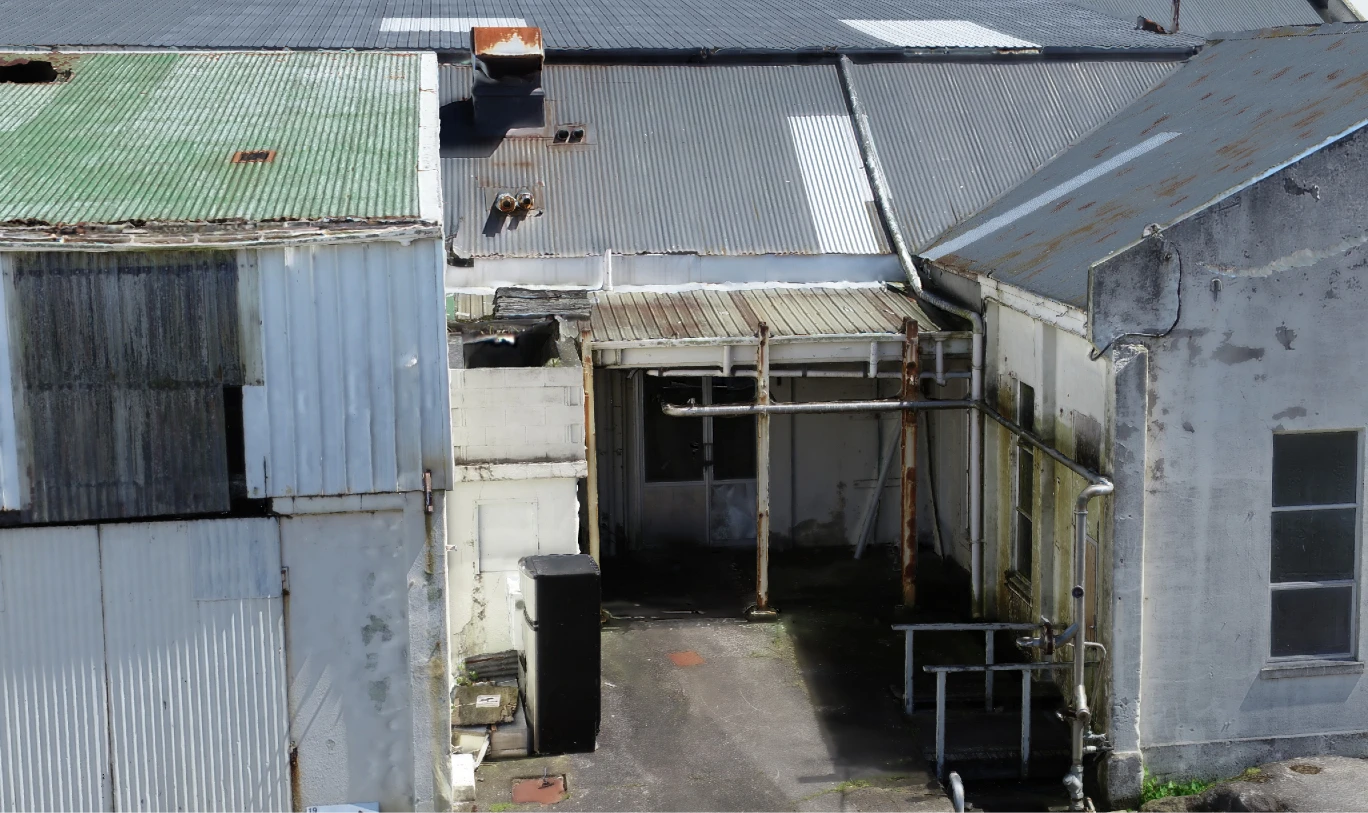
A covered passage between buildings at the Ōkato cheese factory in the 3D inspection model: rusting steel posts holding up a corrugated canopy, pipework running along the wall down to valves, handrails beside steps, a wheelie bin and roof flues behind
Into the gaps between buildings. Our earlier models were built mostly from above, so a passage like this would have been a dark slot. Here the vertical faces carry as much detail as the roofs: the rusting posts holding up the canopy, the pipework running along the wall and down to its valves, the handrails by the steps, and the flues on the roof behind. This is the kind of detail an inspection needs, and it is new for us.
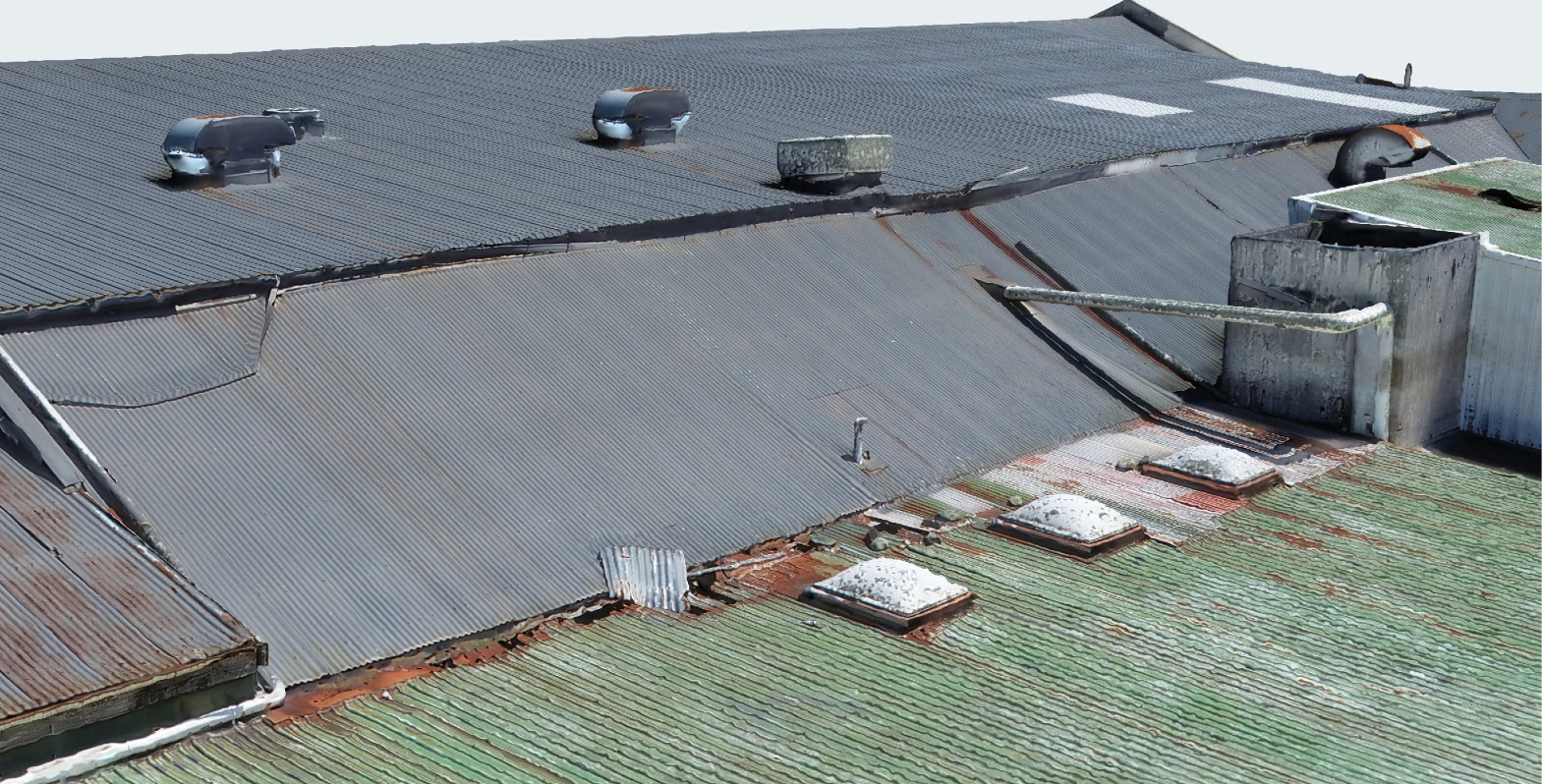
Roofs of the Ōkato cheese factory in the 3D inspection model: corrugated sheets with rust along the laps and around three skylights, patched sheets, lifting flashings at the step between roofs, roof ventilators and an old extract stack with a pipe
Roofs, sheet by sheet. Rust along the laps and around the skylights, patched and replaced sheets, flashings lifting at the step between roofs, and the ventilators and old extract stack, each in place and measurable. It is ideal for planning repairs with your team in the office: pan round, look at each problem from a different angle, and the detail is strong enough to give a good indication of condition without anyone setting foot on the roof.

What an inspection model gives you

  • Condition, without the climbing — look at cladding, roofs, gutters, flashings and fixings up close, from every side, without ladders, scaffolding or a shutdown.
  • Measurements from your desk — lengths, heights, clearances, angles and areas, in real survey coordinates.
  • A record to compare against — a dated, complete record of the site, so later changes can be measured rather than guessed.
  • One picture for everyone — owners, engineers, contractors and insurers can all look at the same site at the same time, wherever they are.

How to measure

  • Distance — click two points. You get the straight-line distance, the horizontal distance (as it would be on a map), the height difference, and the slope.
  • Height — click two points to get only the height difference between them, the way a surveyor's level would.
  • Angle — click three points; the second click is the corner. You get the angle at the corner, and the angle as seen from above where that differs.
  • Area — click the corners in order, then press Finish (or click the first corner again). You get the area as it would be drawn on a map, the distance round the edge, and each side's length. A shape whose edges cross is refused.
  • Position — click a point for its NZTM2000 coordinates and its height above sea level (NZVD2016).
  • Moving around — left-drag to move, right-drag or middle-drag to turn, scroll to zoom; or use the buttons at the left of the model. The house button returns to the start view.
  • Accuracy tip — zoom in and look at the surface you are measuring face-on. A point clicked on a surface seen at a shallow, glancing angle can land a little way along it, because one screen pixel covers more ground there.

What the model can and cannot tell you

The model is shown at its full detail; it is not simplified for the web. The buildings are the sharpest parts. Trees and shrubs move in the wind, so they come out less solid than the buildings.

The centimetres shown in a measurement are the display resolution, not a guarantee of accuracy. A measurement is only as good as the two points you click, so zoom in and click on a clear edge, and keep to hard surfaces.

Shiny stainless steel

The day we captured the site was bright and sunny, and the stainless steel tanks and pipework reflected it. Reflections shift from one photo to the next, so parts of those surfaces have come out with odd shapes and artefacts. That is common in photo-based models and is often simply accepted, but stainless steel is in almost every factory, so we are working on it: on the next site like this we will capture far more around reflective plant, and the robotic LiDAR scanner we are building will add measurements that do not depend on reflections at all.

How accurate it is, honestly

We checked the model against ten ground control targets, each surveyed with a GNSS rover. Seven of them agree with the model to about 3 cm (3.0 cm across the ground and 3.2 cm in height, root mean square; the largest single difference is 6.4 cm in height). Three are further out: about 10 cm in height, and one of them 16 cm across the ground. Those three were propped at about 45 degrees against the buildings so they could be seen both from above and from the side, and a tilted target hard against a wall is harder to pin down, for the camera and for the GNSS receiver alike. We are changing how we place targets near buildings because of it. These figures are how closely the finished model fits the targets it was tied to, not separate check points. We would rather you know where a model is strong and where it is not.

Positions and heights

Positions are in New Zealand Transverse Mercator 2000. Heights are in NZVD2016, New Zealand's vertical datum, so a height here is a height above sea level rather than above the GPS ellipsoid (which sits about 22.1 m lower at this site). Height differences between two points do not depend on that choice.

With a base map on

The base maps are flat: they carry no terrain, so the model is set down on the map rather than hovering at its true height above it. Its position on the map is right, and the map's own photo was taken on another day. Choose None to see the model on its own.

Back to the 3D models

Need a drone survey of your place?

Tell us about your land and we'll take it from take-off to finished map.

Get in touch